

Maks Hapchuk
Founder of PROANALYTICS.ACADEMY & Web Analyst & MarketerWhat Analytics Tools Does Marketing Need?
If someone had asked me back in 2017 to name the basic toolkit for a web analyst, the setup would have been pretty simple: Google Tag Manager collects the data, and Google Analytics helps analyze it. For many companies, these two tools still remain the only tools they use. But today, that toolkit is no longer enough.
And the reason isn't that the GA4 interface is inconvenient compared to Universal Analytics. The very logic of working with data has changed: part of the information no longer reaches analytics systems due to the spread of ad blockers, part of the interactions happen off-site, and the real data about customers, orders, and payments is stored in a CRM or the business's internal systems, and part of the information is lost due to the quirks of certain browsers, and so on. That's how much the world has changed over these nearly 10 years. And analytics has changed just as dramatically.
Modern web analytics should be built not around a single interface, but as an architecture that combines GA4, a CRM, advertising platforms, a data warehouse, a BI system, and server-side data collection tools. GA4 remains an important component in this architecture, but it can no longer be the single source of truth. In this article, I'll break down which tools a marketing team needs, how they connect to one another, and, most importantly, what task each tool helps solve.
- Why GA4's capabilities are no longer enough
- How to build a complete web analytics system
- Two tasks of modern analytics: reporting and ad optimization
- CRM as a source of customer and sales data
- Why it's important to have a separate data warehouse
- How to load and prepare data in BigQuery
- Using the prepared data
- GTM, server-side GTM, and Google Tag Gateway: data collection, transfer, and consent
- Additional tools that can complement the analytics stack
- How to build a stack for your business's specific tasks
- Instead of a conclusion
- FAQ
- What alternatives to GA4 exist?
- Conversion data from BigQuery reaches Google Ads with a delay. Can this be sped up so PPC specialists can make decisions faster?
- What's the better way to set up data transfer from a CRM to Google Ads: from the CRM to GA4 and then import conversions from GA4 into Google Ads, or send data from the CRM directly to Google Ads?
- If Meta Pixel code is moved from the browser to the server, who generates the click identifiers? Will Meta be able to determine which ad a user came from if _fbc and _fbp are generated independently?
- Does it make sense to set up server-side GTM if a site only gets 200–500 visitors a day?
- Can separate accounts or server containers be created for different sites in GTM, and how does their number affect cost?
- Why can some sales be attributed to direct after a user returns from a payment system, and can CRM data help recover the traffic source?
- How do you evaluate the impact of display campaigns if users don't click on the ads, but direct sales and branded search queries increase after the campaign launches?
There's a detailed breakdown of the nuances of choosing systems ahead. But if you want to jump straight to the final diagram, click here.
Why GA4's capabilities are no longer enough
Google Analytics has traditionally been the first system mentioned when it comes to web analytics. That makes sense: the tool is free, well known in the market, and covers the basic task well — showing how users interact with a site or app. The problem isn't that GA4 has become "bad." It's simply that the customer journey has changed, and today GA4 only sees part of that journey.
Gaps appear at several levels at once:
- Part of the web data never reaches GA4.
Browsers limit how long cookies are stored, ad blockers stop some requests, and user consent requirements create additional gaps. - The real business outcome often doesn't happen on the site.
Many years ago, it was enough to track the volume of site traffic and the number of forms submitted. But modern web analytics goes much further: all the way to actual purchases and repeat purchases. GA4 can register a lead, a visit to a thank-you page, or the start of checkout, but it has no way of knowing whether payment actually went through, whether the order was cancelled, or how much money the business ultimately received. Information about customers, sales, and money is usually stored in a CRM or an internal database. - The path to purchase now extends beyond the website.
Web analytics was originally built mostly around sessions, then the user became the focal point, and now agents that can act on the user's behalf are being added to that journey. A user can already find a product, compare offers, and place an order inside an AI interface. Google is developing Universal Cart and the Universal Commerce Protocol, while OpenAI is developing the Agentic Commerce Protocol. Part of the interaction with a brand is gradually moving off-site, so GA4 physically cannot see the whole context.
As a result, modern analytics has long stopped being just about answering the question "What did the user do on the site?" It needs to help you understand:
- who ultimately became a customer;
- what exactly they purchased;
- how much money they brought to the business;
- which marketing touchpoints may have influenced the decision;
- what data needs to be fed back into advertising systems for further optimization, and so on.
The core business goal hasn't changed: a business wants to understand how much it actually earned from its investment in the site and marketing. GA4 should remain the source of data on web behavior, while information about customers, orders, and payments needs to come from the systems where those events are actually stored.
Why sending CRM conversions to GA4 doesn't give you the full picture
Technically, we can send data from a CRM to GA4. There's a mechanism for this called the Measurement Protocol, which lets you send events into GA4 from a server, a CRM, a database, or another backend system.
I've written a separate article going into more detail on how to send data from a CRM to GA4 via the Measurement Protocol using server-side GTM.
But there are a few important limitations here.
- First, if you want an offline event to correctly inherit the source, medium, and campaign of a specific online session, Google recommends sending it no later than 24 hours after that session began, and the maximum allowed window is 72 hours — this is a hard limit of the Measurement Protocol itself.
Imagine a SaaS product with a seven-day trial. Today a user comes in from Google Ads and activates the trial, and seven days later pays for a subscription. Because of these time limits, you won't be able to correctly "attribute" that payment back to that original session and show GA4 that this specific session generated the revenue. If, at an online store, the time between placing an order on the site and the customer actually picking it up exceeds 72 hours, you'll run into the same limitation. - Second, linking an offline event to a user and a session requires the correct identifiers, specifically client_id and session_id. But if, say, an ad blocker prevented a cookie from being created, or the user opted out of analytics tracking, you simply won't have those identifiers.
Sure, you could generate a new client_id. But then GA4 will see a separate user that it can't connect to the earlier ad interaction. It's a bit like walking up to an analytics system and saying, "Sam made a purchase," only to hear back, "Which Sam? I've never seen him before."
That's exactly why sending CRM conversions into GA4 shouldn't be treated as a universal way to build end-to-end analytics.
In some cases it can work — for example, if almost all purchases happen within a short window, you have the necessary identifiers stored, and there are no major gaps caused by consent banners. But for most businesses, it's better to combine GA4 and CRM data not inside Google Analytics itself, but in a separate data warehouse.
So let's break down what components a complete web analytics system should consist of and how to connect them.
How to build a complete web analytics system
A complete analytics system shouldn't just collect events from the site. It needs to combine data about user behavior with actual sales, store it in an independent environment, turn it into clear reports, allow for simple "conversations with the data," and feed results back into advertising platforms. Yes, modern web analytics is no longer just about classic analytics — it's now also very much about training advertising campaigns on the data that analytics produces.
Two tasks of modern analytics: reporting and ad optimization
It's useful to split modern web analytics into two parts.
- The first is analytics for analytics.
Its goal is to pull data together from various systems, process it, build reports, and help the business make decisions. - The second is analytics for advertising.
Data isn't only needed by people — it's also needed by advertising platform algorithms. Google Ads, Meta Ads, LinkedIn, and others need to understand which leads ended up as actual paid orders and which customers have the highest value.
These two parts don't exist separately. If you've already brought together information from CRM, GA4, ad accounts, email campaigns, and call tracking in one place, that same prepared data can be used both for reporting and for ad optimization.
That's precisely the advantage of the right architecture: you don't build a separate integration for every new task — you build a foundation that can then be expanded.
CRM as a source of customer and sales data
In this piece, by CRM I don't just mean classic systems like HubSpot or Salesforce. For a SaaS product, this could be an internal database of subscriptions and payments. For an online store, it could be the site's admin panel where orders are stored. In other words, this is essentially any database that holds information about customers and actual financial results.
It's the CRM, or a system performing its function, that should be the source of truth for sales. Ideally, the amounts in it should reconcile with what shows up in the company's bank accounts. If a customer paid, the CRM should clearly show who did it, when, for which product or service, and for how much.
If you don't have such a system, building complete marketing analytics will be very difficult. You can analyze traffic, clicks, and on-site behavior, but you won't have a reliable answer to the main question: how much money the business actually made and which marketing activities influenced that.
At the same time, I don't recommend building all of your analytics directly inside the CRM. There are many different CRM systems, each with its own limitations, structure, and approach to reporting. In some, you can build a decent report; in others, the analytics capabilities are minimal; and sometimes a business ends up switching CRMs and risks losing convenient access to historical data.
That's why CRM data should be the foundation, but working with it — and, more importantly, combining it with data from other systems — is better done in a separate analytics environment.
Why it's important to have a separate data warehouse
The need for a warehouse arises when a single system's data is no longer enough to answer a business question. GA4 shows website interactions, the CRM shows customers, orders, and payments, and advertising platforms show spend and campaign results. As long as this information is stored separately, the business only sees fragments of the customer journey.
You could build direct integrations between every pair of systems, but with every new source, this setup gets more complex — you need to maintain more and more connections. Analysts figured this out and decided it makes more sense to turn an independent warehouse into the central point of the analytics architecture.
In such an architecture, each system sends to the warehouse the piece of information it's responsible for:
- GA4 sends on-site interaction data to the warehouse;
- the CRM sends information about customers, orders, and payments;
- advertising platforms add spend, campaigns, clicks, and impressions;
- other marketing systems pass along their own data;
- inside the warehouse, all of it is processed and combined.
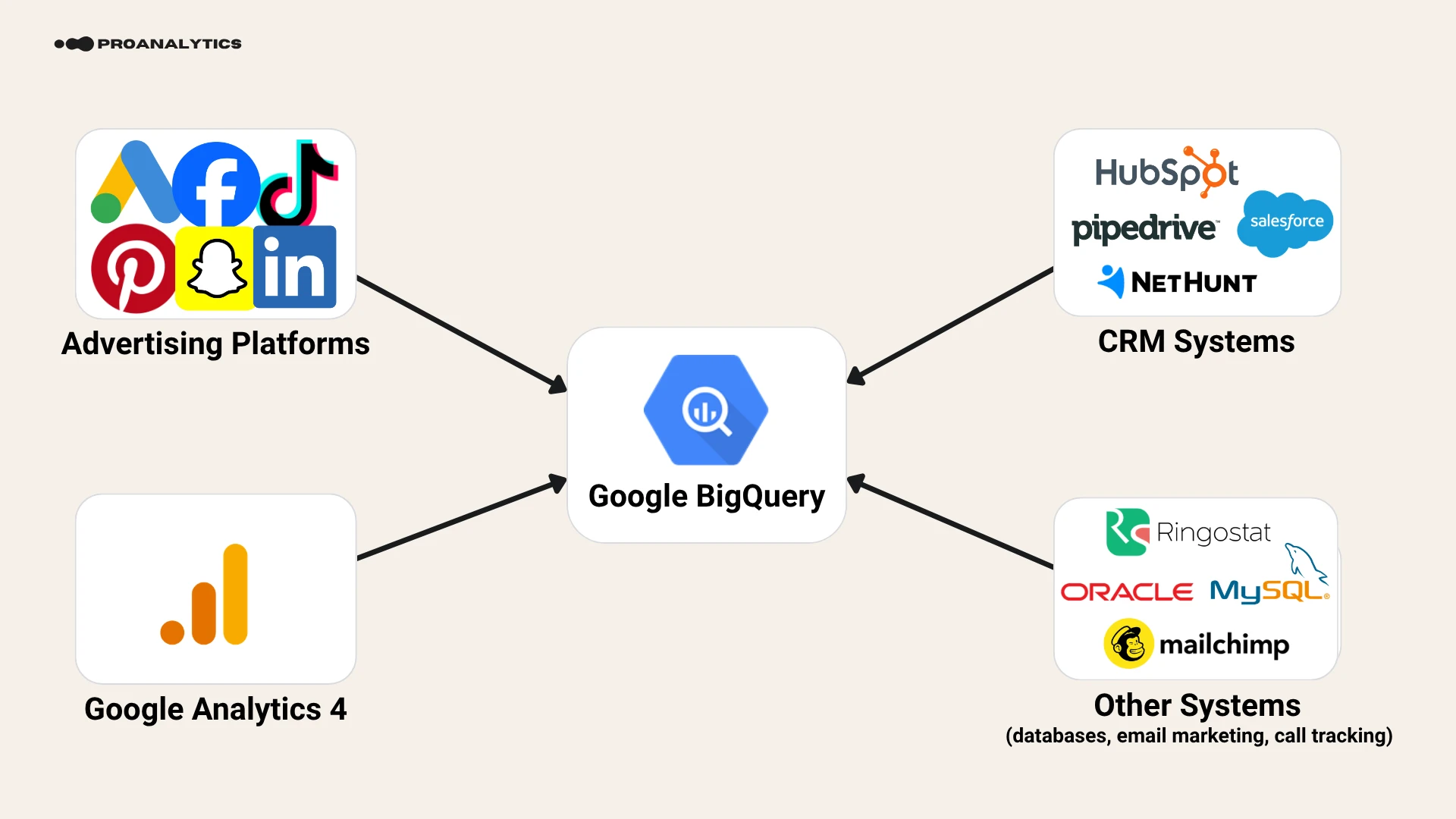
Inside the warehouse, data is cleaned, reconciled, and combined so it can be used for reporting and for sending on to other systems.
The main advantage of an architecture with a separate warehouse is that the business controls its collected data and doesn't depend on any single platform's interface. If a company decides to switch CRMs, the historical information stays in the warehouse. If Google releases a new version of Google Analytics or removes some functionality, your data won't disappear. If an ad account gets blocked, previous results are still available for analysis.
In our own practice, we've had projects that switched CRMs but kept working with the entire history, because it had already been accumulating in such a warehouse. The same thing happened during the move from Universal Analytics to GA4: it was impossible to transfer the entire history into the new interface, but data from the old system could be preserved in a separate warehouse and used going forward.
Cloud or self-hosted warehouse
Once the role of the warehouse is clear, the next decision is where to host it. At the top level, warehouses can be split into cloud and self-hosted.
A self-hosted solution might look attractive: the database sits on your own server, and the internal team has full control over everything. But along with that control comes the need to handle resources, updates, backups, access rights, security, and scaling yourself.
I once worked on a project where a new report required adding data to such a self-hosted database. There wasn't enough space for the new data, so the project's marketer had to file an internal request for additional budget, wait for a technical specialist, and go through internal approvals. In the end, the needed resource showed up about six months later.
That's obviously an extreme example. But it illustrates the problem well: instead of analyzing data, the analyst or marketing team ends up managing infrastructure — even if only administratively rather than technically — and that's still resources going somewhere they shouldn't.
So my recommendation is simple: unless you're a large company with a dedicated technical team ready to quickly handle marketing requests, don't shoot yourself in the foot — use a cloud solution.
In the cloud, you don't need to buy a server "with a margin" in advance, wait for extra disk space, or keep a dedicated database administrator on staff. Resources scale as needed, even without your involvement, and you only pay for what you actually use.
Popular options include Google BigQuery, Snowflake, as well as warehouse solutions within the AWS and Microsoft Azure cloud ecosystems. All of them can handle modern analytics tasks. But for marketing analytics, I most often recommend BigQuery specifically.
Why BigQuery is worth considering for marketing analytics
I'm not claiming BigQuery is technically the best option in every possible situation. In some cases, Snowflake or another product mentioned above may have the edge. But if you're building marketing analytics from scratch, BigQuery has a strong practical argument in its favor — it's part of the Google ecosystem.
It's easy to imagine a company that doesn't advertise on Amazon or use Microsoft Advertising. But it's hard to imagine a modern online business with nothing at all from the Google ecosystem: Google Ads, GA4, Search Console, Merchant Center, YouTube, Google Play, and so on. Native integrations between BigQuery and other Google services often save the marketing team time and budget that would otherwise go into weeks of extra development.
I've already covered what BigQuery is, how to get started with it, and what benefits it offers marketing in a separate article, which also describes integration with GA4, Google Ads, and other data sources. Here, let's focus specifically on BigQuery's role in the modern analytics stack.
Especially important for marketing analytics is exporting GA4 into BigQuery. This is the only native way to regularly get raw, record-level Google Analytics events. Through the reporting API, you only get data that's already processed and aggregated, not the full raw dataset.
Even if a company's main corporate warehouse sits in Azure or another ecosystem, BigQuery can still serve as an intermediate layer for the GA4 export: raw events first land in BigQuery and are then sent on to the main warehouse.
For most projects, the standard GA4 export is enough. If the standard GA4 export isn't sufficient (for example, due to its limits or the specifics of streaming export), one option is to write events from server-side GTM directly into BigQuery in parallel. But that's already a custom data-collection pipeline, not a full one-to-one replacement of the native GA4 → BigQuery export.
At the same time, BigQuery can do more than just store data. Combined with other Google Cloud services, it helps load, transform, analyze, and send data on to other systems. So next, let's look at a practical question: how to gather data from various sources in BigQuery and prepare it for reporting and use in marketing platforms. A bit later in this same article, I'll also cover why BigQuery is convenient for sending data to advertising systems.
How to load and prepare data in BigQuery
Loading data: BigQuery Data Transfer Service, Google Cloud Datastream, Fivetran, Airbyte, and custom integrations via Google Cloud
We've established why a warehouse is needed and why BigQuery is worth considering for marketing analytics. Now for the key practical question: how do you get data from a CRM, advertising platforms, payment services, and other sources into it?
There's no universal answer. Depending on the source, you can use a native integration, a ready-made third-party connector, or your own custom code.
BigQuery Data Transfer Service
BigQuery Data Transfer Service lets you set up regular, automatic data loading without building your own infrastructure.
The service supports many sources, and the list keeps growing, including:
- Google Ads;
- Google Merchant Center;
- YouTube;
- Google Play;
- Campaign Manager and other Google products;
- Facebook Ads;
- Salesforce;
- HubSpot;
- Klaviyo;
- Mailchimp;
- Shopify;
- Stripe;
- PayPal;
- PostgreSQL, MySQL, SQL Server, and other databases.
For many connectors, the process itself is fairly simple: you pick a source, go through authorization, specify the account ID, a schedule, the loading period, and the dataset where the data should be stored.
Google Cloud Datastream
Datastream is designed primarily for replicating changes from operational databases. It works on a Change Data Capture basis: it tracks inserts, updates, and deletions and sends those changes into BigQuery with low latency.
This is a good option when a CRM or internal system runs on PostgreSQL, MySQL, SQL Server, Oracle, or another supported source, and the business needs near-real-time data without regularly copying entire tables.
Data Transfer Service and Datastream solve different problems. The first is convenient for scheduled loading of data from SaaS tools, marketing platforms, and databases; the second is for continuously transferring changes from operational systems.
My colleague did a detailed practical comparison of these two services in the article "How to Transfer Data from PostgreSQL to BigQuery: Data Transfer vs Datastream." Using PostgreSQL as an example, it shows how both approaches work, how they differ in update frequency, setup complexity, and cost, and when to choose which.
Fivetran and Airbyte
If Google's native options aren't enough or don't fit a specific system, you can use ready-made third-party solutions. Among the most popular are Fivetran and Airbyte.
They have a large library of connectors and can send data not only to BigQuery, but to other warehouses as well. That's an important point: if your infrastructure is built on Snowflake, Azure, or AWS, these services can also cover a large part of your integrations.
Custom integrations via Google Cloud
If there's no ready-made solution, you can build your own loading process. In Google Cloud, this often relies on the following combination:
- Cloud Scheduler triggers the process on a schedule.
- Pub/Sub sends a message announcing the trigger.
- Cloud Run function runs the code, retrieves data via an API, and writes it into BigQuery.
The code is most often written in Python, though other environments, including Node.js, are also available.
On paper, this can sound like a set of separate, complex services. In reality, all of them sit within Google Cloud and work together smoothly. This is exactly what I mean when I say BigQuery isn't just a database — it's part of a much larger ecosystem.
Data transformation: dbt and Dataform
Once many data sources accumulate in BigQuery, the SQL queries start growing too. You need to systematically manage dependencies between tables, code versions, testing, and refresh schedules.
- The best-known tool in this category is dbt. It has become the de facto standard for organizing analytics transformations across many teams.
For more on how it works and what it can do, see "DBT: A tool that opens new horizons in data work."
- Google has its own solution — Dataform. Both tools can work with BigQuery and each has its own pros and cons.
In our own projects, we use Dataform: it's part of Google Cloud and covers our current needs. For infrastructure built around BigQuery, it's a convenient choice, since all the main tools stay within a single ecosystem.
But that's our practical choice, not a universal recommendation. dbt is also a strong solution, so if a team already has an established dbt project, the relevant expertise, and working processes, there's no need to switch to Dataform just because it lives inside Google Cloud.
If you've decided to use a different cloud provider, dbt will be the better choice.
Using the prepared data
Once data is loaded and transformed, it can be used in two directions. The first is for building reports and making decisions. The second is for ad optimization: sending real conversions and audiences to advertising platforms.
BI system: turning data into reports
A data warehouse is great at storing information, but a business rarely needs tables with millions of rows. What it needs is a clear report that helps it make a decision.
That's where BI systems come in. Among the best known are:
- Power BI;
- Tableau;
- Data Studio (Looker Studio).
Don't confuse Looker with Data Studio (Looker Studio), which used to be called Looker Studio and recently switched its name back to Data Studio (don't ask me why these name changes keep happening — ask the Google team). Data Studio (Looker Studio) is a popular, convenient data visualization tool, especially for simple marketing reports. But in this article, I'm not putting it in the same category as full-fledged BI platforms, which have much broader capabilities.
Which one should you choose? If you have enough expertise and time for setup, Power BI, Tableau, or Data Studio (Looker Studio) will all deliver a solid, fairly comparable result for most typical marketing tasks. The difference will come down to price, ecosystem, ease of use for the team, and the specifics of your particular project.
If you're choosing between Power BI, Tableau, and Data Studio (Looker Studio), we compared their capabilities for building reports and dashboards in more detail in a separate article, "Power BI vs. Tableau vs. Data Studio (Looker Studio): An Overview and Comparison of the Tools."
We most often use Power BI, and the reason is fairly mundane: historically, it had the lowest barrier to entry in terms of license cost, especially for small teams. On large enterprise projects, the final cost of different platforms can converge, but for small and mid-sized businesses, the starting price matters.
And, of course, the fact that Power BI consistently ranks at the top of business intelligence tool rankings year after year plays a role too.
At the same time, I don't think Power BI is the only correct answer. If a team is already working in Tableau, Data Studio (Looker Studio), or another BI system and it's getting the job done, there's no reason to switch just for the sake of switching.
If you'd like to see what this kind of analytics looks like in practice rather than in theory, we have a few detailed case studies. In the Reply.io case study, we showed how we combined data from a large number of sources and built centralized reporting in Power BI. And in the Stripo case study, we showed how Power BI became one layer of a complete analytics system alongside BigQuery, attribution, and an AI assistant.
Using data for advertising
Prepared data can be fed back into advertising platforms for two main purposes: sending confirmed conversions and updating audiences based on CRM data. Let's start with conversions, then move on to audiences.
Sending conversions to Google Ads
GA4 might register an event for reaching a thank-you page. But a thank-you page doesn't necessarily mean an actual payment was made: an order could have been cancelled, or a payment could have failed. It's far more useful for the ad algorithm to receive the final status from the CRM.
For Google Ads, there's a native integration through Data Manager. You can connect BigQuery as a source and use prepared data for conversion tracking.
This is especially useful in cases with a long sales cycle:
- a user submitted a lead today but paid a week later;
- a customer started a trial and purchased a subscription later;
- a sale is confirmed by a manager in the CRM;
- the order's value changes after a return or an upsell.
In these cases, it makes more sense to store the actual outcome in BigQuery and send it directly to the ad system, rather than first trying to reconstruct the purchase inside GA4.
Sending conversions to Meta, TikTok, and other platforms
For Meta and many other advertising systems, there isn't as simple a native connection to BigQuery as there is for Google Ads. Confirmed conversions can be sent via an API using a custom Cloud Run function.
The same approach works with platforms that have a Conversion API or another server-side endpoint: Meta, TikTok, Pinterest, Snapchat, Microsoft Advertising, and others.
Confirmed conversions can be sent via the API. The frequency depends on the task: for some projects, one update a day is enough; for others, it's important to send events right away.
Sending audiences to advertising platforms
Advertising platforms can receive more than just confirmed conversions. In BigQuery, you can build segments based on CRM data and then send them to Google Ads through a native integration, or regularly update them in Meta, TikTok, and other platforms via an API. For example:
- customers who stopped paying for a subscription;
- buyers of a specific product category;
- users with high LTV;
- customers who bought one part of a bundle but not the other;
- users it's time to offer a repeat purchase to.
We have a long-standing client for whom we first automated a single scenario: the system finds people who bought one part of a product bundle but didn't purchase the other part, and creates advertising audiences for them. Over time, the number of such automated audiences grew to roughly five hundred, with the data refreshed daily based on the CRM.
This approach can produce fuller, more controllable audiences than relying only on the data an ad system managed to collect through a browser pixel.
At the same time, BigQuery can send audiences not just to ad accounts, but also, for example, as lists to email marketing systems. Many of the latter even have their own built-in integrations.
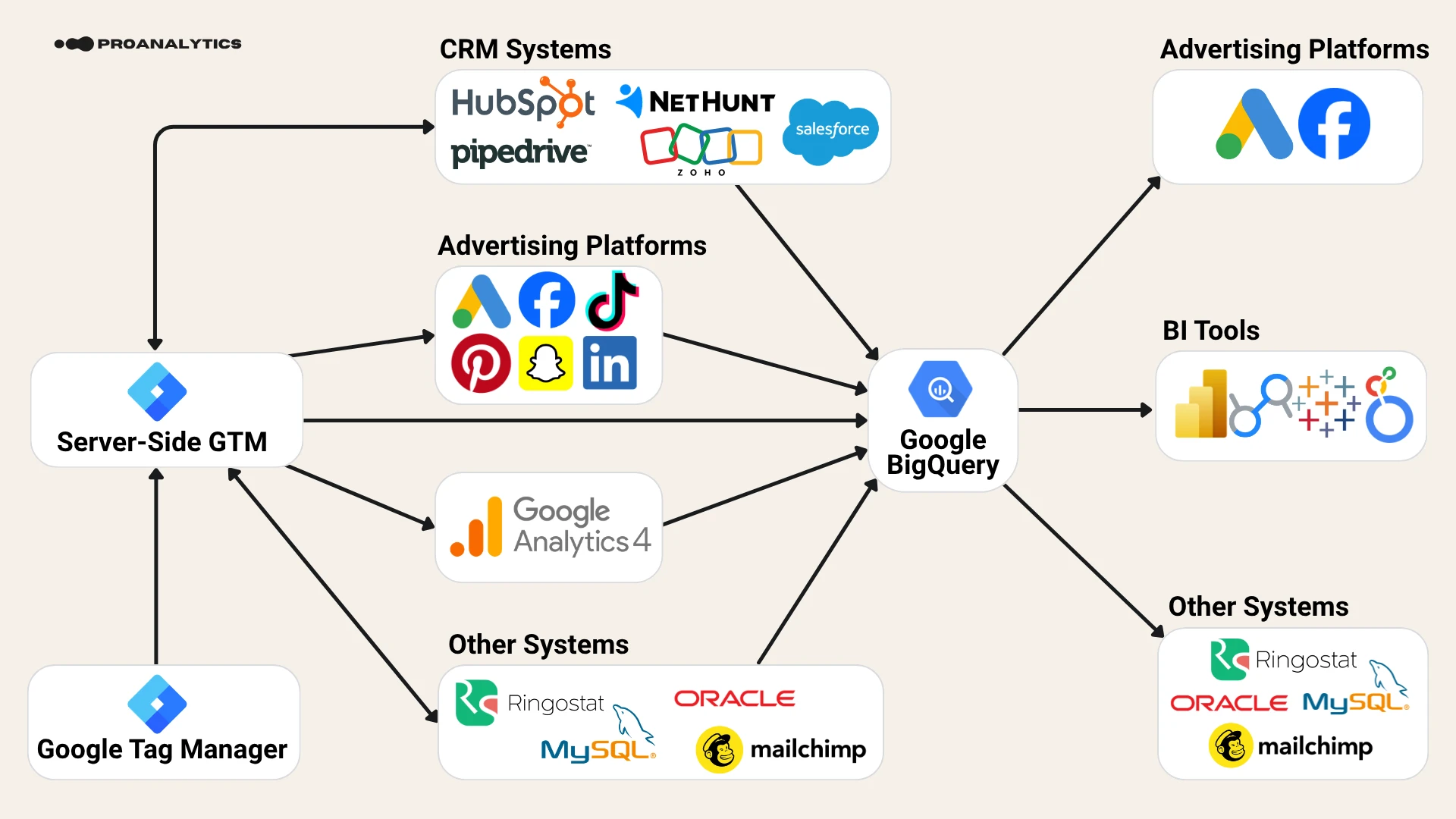
As a result, BigQuery becomes more than just a storage location — it becomes the central point from which prepared data flows into BI systems, advertising platforms, email services, and CRMs. The full diagram below shows the entire cycle: from collecting and combining data to building reports and sending the right signals to marketing systems.
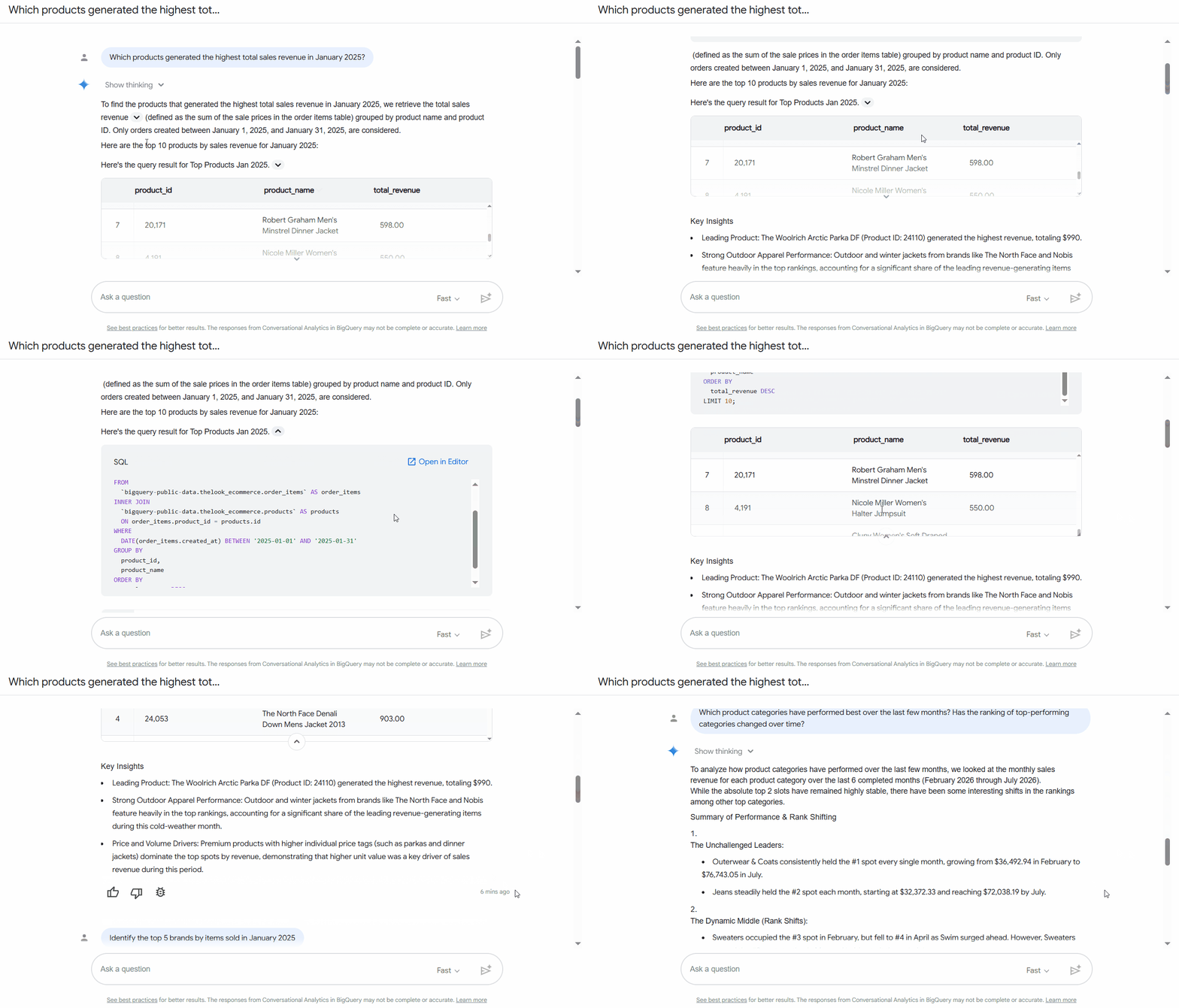
But that's still not everything, because in today's world, a good analytics system also needs to let you easily integrate it with agents that work with data. And our current setup fits this perfectly. You even have several options: you can use the built-in Conversational Analytics agent in BigQuery (a detailed guide from me on how to do this is linked here) or connect your own agents to data in BigQuery or Power BI (and here's a link to one solution we built for a partner).
Now that we've covered the core architecture of modern web analytics, let me pause on something else. As I mentioned at the start of this piece, the basic tools of web analytics have always been Google Analytics and Google Tag Manager. We've covered what Google Analytics has now turned into above. Let's now go through everything related to GTM.
GTM, server-side GTM and Google Tag Gateway: data collection, transfer, and consent
For data to be combined and used, it first needs to be properly collected and sent from the site to the right systems. At this level, the main roles are played by GTM, server-side GTM, and Google Tag Gateway.
For most projects, Google Tag Manager remains the basic tool. It lets you respond to user actions and send information into GA4, Google Ads, Meta, and other systems without constantly making changes directly in the site's code.
In the traditional setup, the GTM web container runs in the browser:
- The user takes an action on the site.
- The web container receives information about that action.
- Tags send requests directly to GA4 and advertising platforms.
In other words, the browser interacts directly with third-party platforms:
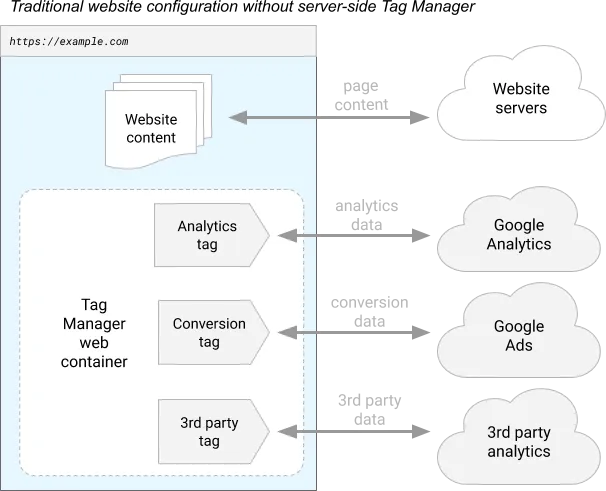
Diagram taken from the official documentation: https://developers.google.com/tag-platform/tag-manager/server-side/intro
The problem is that every additional vendor adds its own scripts to the page, which can slow down site loading for the user. On top of that, requests to analytics or advertising platforms can be blocked by the browser or by an ad blocker.
This is where server-side Google Tag Manager comes in.
How server-side GTM works
In a setup with server-side GTM, a server container is added between the site and the external platforms:
- The web container sends data to your tagging server.
- The server container processes the request.
- From there, the information is sent on to GA4, Google Ads, Meta, TikTok, and other systems.
In other words, server-side GTM adds a controlled server-side layer between the site and external systems.
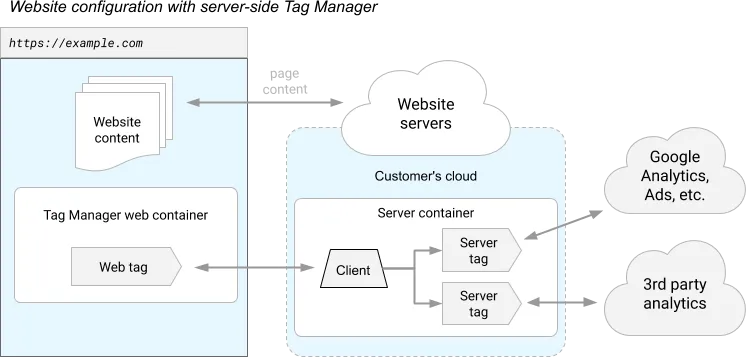
Diagram taken from the official documentation: https://developers.google.com/tag-platform/tag-manager/server-side/intro
In effect, you're creating a controlled intermediate point. Data doesn't scatter straight from the browser to a dozen third-party vendors at once — it first passes through an environment that you control.
An important nuance:
Server-side GTM can receive data not only from the web container. It can also receive events from a backend, a CRM, or a database, and then send them on to analytics and advertising systems from there.
At the same time, server-side GTM shouldn't be used as a universal tool for handling all CRM data. For storing history, complex transformations, deduplication, regularly recalculating audiences, and reprocessing data, it's usually better to first use a separate data warehouse.
So the connection "CRM or database → server-side GTM" isn't inherently a mistake, but it should only be used when it actually fits the specific task.
You can read about the pros and cons of server-side GTM in the article "Pros and Cons of Server-Side GTM. Why You Should Implement It Now."
And I walked through the step-by-step deployment of server-side GTM on Cloud Run — including setting up servers, connecting a subdomain, and estimating costs — in this piece: "Server-Side GTM in Cloud Run: Step-by-Step Setup, Cost, and Subdomain Connection."
Google Tag Gateway or server-side GTM?
Google Tag Gateway lets you load the Google tag and send part of your measurement requests through your site's first-party infrastructure. It can be set up through a supported CDN, load balancer, web server, or alongside server-side tagging.
At first glance, Google Tag Gateway and server-side GTM solve a similar problem: they both help with working in a first-party context for Google measurement. But they shouldn't be treated as complete equivalents.
Google Tag Gateway is focused primarily on the Google tag and Google products. Server-side GTM offers broader capabilities:
- it works not just with Google, but with other advertising systems too;
- it allows you to modify, filter, and enrich data;
- it helps move some third-party logic from the browser to the server;
- it can accept events from different sources;
- it gives you more control over request routing.
If you already have server-side GTM correctly set up, you're most likely already using a first-party approach. At the same time, Google's current documentation also describes a combined architecture in which a CDN loads Google scripts from a first-party domain while a server container handles collecting and processing data.
So the choice depends on the task: Google Tag Gateway helps move the Google tag's work into a first-party context with fewer resources, while server-side GTM is needed when broader routing, processing, data control, and a first-party approach for other advertising platforms matter.
Additional tools that can complement the analytics stack
By this point, we've built a basic system:
- a CRM or internal database stores information about customers and revenue;
- GA4 collects data on interactions with the site;
- BigQuery combines different sources;
- a BI system visualizes the results;
- data flows back into advertising and marketing platforms;
- GTM, server-side GTM, and Google Tag Gateway handle the technical level of collecting and sending events.
For many companies, this is already enough. But depending on your needs and where your business operates, the stack can — and sometimes should — be extended with other tools.
Consent Management Platform (CMP): managing user consent
If a business operates in regions where user consent is required for analytics and advertising cookies — for example, in the EEA — it's worth using a dedicated Consent Management Platform.
This matters not only for GDPR compliance. Incorrectly sending consent signals can limit your ability to measure conversions, optimize campaigns, and personalize ads in Google Ads. We covered a concrete example of this in the article "No Banner, No Conversions: Google Started Blocking Data Transfer to Google Ads."
Among the solutions we work with and can recommend:
The choice depends on the number of domains, your geography, the integrations you need, and pricing.
I don't recommend building a consent banner yourself, especially if the site operates in multiple countries. Requirements vary by region, and maintaining all that logic, cookie scanning, and policy updates yourself is often more expensive than paying for a ready-made service.
Session replay, heatmaps and UX analytics
Quantitative analytics shows you what happened: how many users left a page, at which step conversion dropped, which segment is performing worse.
But sometimes you need to understand why it happened. That's where these help:
- session recordings;
- heatmaps;
- surveys;
- click and scroll analysis;
- other UX research methods.
Among the most popular tools are Microsoft Clarity and Hotjar. Clarity is free, so there's often no reason not to try it for a basic start.
In my view, one of the strongest specialized products in terms of functionality is FullStory. Crazy Egg is another option worth considering.
Session recordings and related functionality are also available in more comprehensive platforms, including PostHog and Amplitude. In Matomo, similar functionality is available separately through Heatmap & Session Recording. If a product is already using one of these platforms, first check whether the feature you need is available in your plan or configuration.
This is also where an argument for replacing GA4 can emerge. If you need not just one tool, but product analytics, session replay, experiments, and feature flags all at once, a platform like PostHog may turn out to be more practical. But if all you need is basic web data collection, GA4 will still often be the simpler solution.
CDP — Customer Data Platform
A Customer Data Platform is a system that:
- collects data about a user from various sources;
- combines it into a single profile;
- stores the history of interactions;
- allows you to send prepared data on to other systems.
Well-known examples include Twilio Segment and RudderStack. RudderStack historically developed as an open-source solution, although its current model and the availability of individual components have changed over time.
We don't use a dedicated CDP in our own core architecture, because a significant part of the same tasks can be handled in BigQuery with the right data model and SQL.
But that doesn't mean a CDP isn't right for anyone. If a company is already using Segment or another platform, it covers the scenarios it needs to, and it fits the budget, there's no reason to give it up just because similar logic could theoretically be built in-house.
A/B testing and feature flags
For experiments, I'd recommend looking at GrowthBook. It can run either self-hosted or as a paid service, integrates with BigQuery, and fits well into the stack described here.
Feature flags are a separate matter. They're not necessarily an A/B test. For example, a team launches a new feature in a SaaS product but doesn't want to open it up to all users right away. With a feature flag, functionality can be gradually rolled out to a small portion of the audience, its stability checked, and only then rolled out more broadly.
PostHog, among others, has this kind of functionality. If you need product analytics, session recordings, experiments, and feature flags all at the same time, that's another argument for considering a comprehensive platform instead of a set of separate tools.
Agents for working with data
And, of course, in a modern stack, AI agents can no longer be ignored. Different solutions can be used for working with analytics:
- BigQuery Conversational Analytics — functionality for working with data in natural language and creating data agents directly inside BigQuery;
- Claude;
- Codex (ChatGPT);
- Manus.
They handle different tasks. Conversational Analytics is useful for controlled, natural-language work with corporate data and is part of the Google Cloud Platform, meaning it doesn't require connecting additional services. Tools like Claude or Codex, on the other hand, can carry out multi-step tasks and function as an independent AI assistant.
I've already covered step-by-step setup of Conversational Analytics in BigQuery — from knowledge sources and instructions to testing and publishing your own data agent — in the article "How to Set Up Conversational Analytics in BigQuery: Building and Testing Your Own Data Agent."
But the same rule applies here as with any other tool: an agent doesn't fix bad data. If your tables are messy, your business logic isn't documented, and metrics are calculated differently across different systems, AI will just produce a confidently worded wrong answer faster.
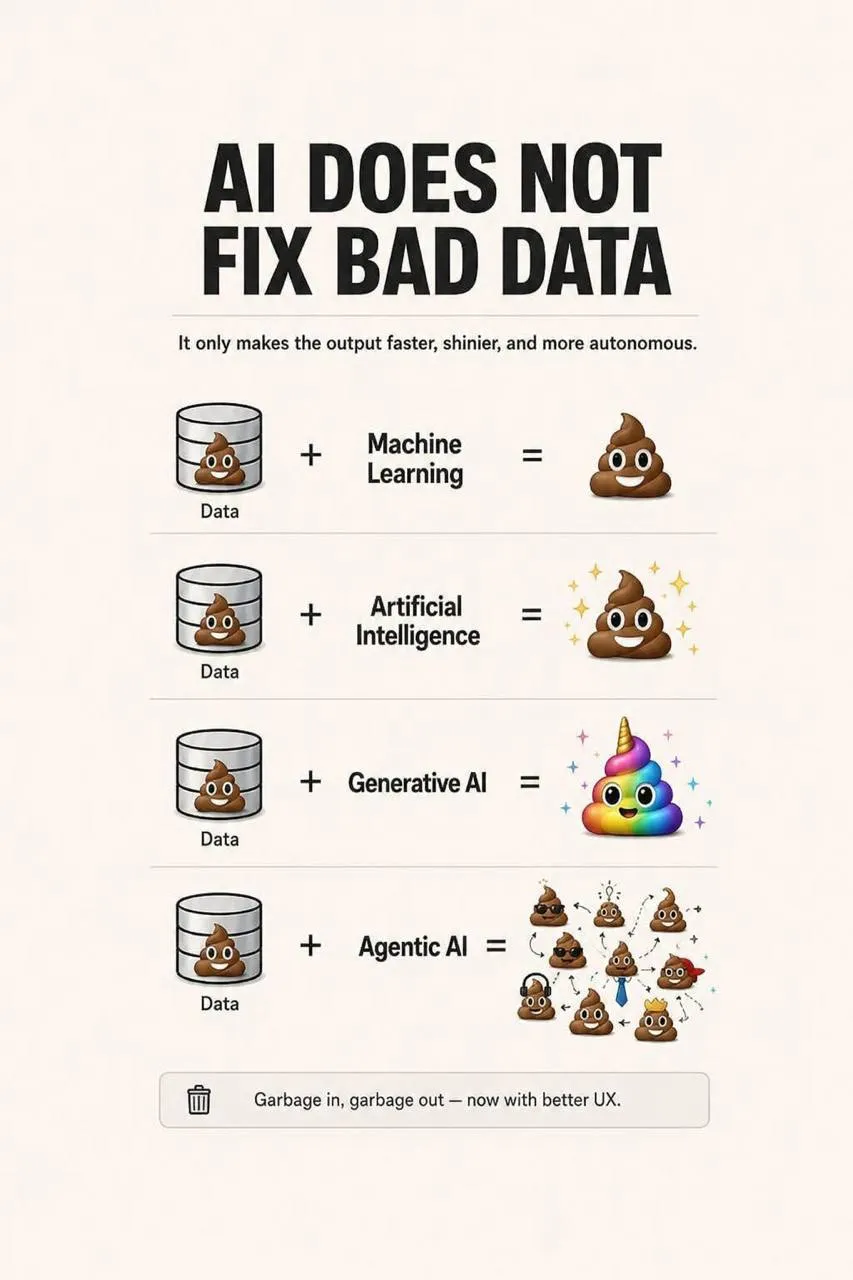
So agents are the final layer on top of a well-built infrastructure — not a replacement for a CRM, a warehouse, transformations, and data governance.
Now that you're familiar with the nuances of choosing systems, let's sum things up.
How to build a stack for your business's specific tasks
After all this, it might seem like a modern marketing department urgently needs fifteen services, three engineers, and a separate budget line for every acronym. In reality, no.
The basic stack for most companies can be reduced to this logic:
- A CRM or internal database stores customers, orders, and actual payments.
- GA4 collects the available data on interactions with the site or app.
- Google Tag Manager manages web tags, with server-side GTM adding a server-side layer for collecting and sending data as needed.
- BigQuery combines the CRM, GA4, ad accounts, and other sources.
- Dataform or dbt systematizes the transformations.
- Power BI, Tableau, or Data Studio turns the data into clear reports.
- Prepared data flows back into Google Ads, Meta, email platforms, and the CRM for optimization and automation.
Everything else gets added only when a real need arises:
- you need legally sound consent — connect a CMP;
- you need to understand behavior on a page — use session replay, temporarily or permanently;
- you need a single customer profile and ready-made integrations for using data across marketing channels — consider a CDP;
- you're running experiments — add GrowthBook;
- you need feature flags — use PostHog or another suitable product;
- you want to simplify access to data — build and set up a data agent.
Don't start with tool logos. Start with the problem you want to solve. After that, choosing the technology becomes much easier.
Instead of a conclusion
Google Analytics 4 hasn't gone anywhere and is still an important part of web analytics. But a modern system can't stop at the edge of its interface.
Traffic is getting harder and harder to track, browser and legal restrictions are creating gaps, and part of the interaction is gradually moving into environments where a classic web tag doesn't work at all. That's why analytics needs to be built on the foundation of your own business data: customers, orders, subscriptions, payments, and profit.
A good stack doesn't have to be big. It has to be cohesive: collecting the data that's available, storing it in an environment the business controls, combining different sources, helping people make decisions, and feeding quality signals back to advertising algorithms.
Modern web analytics isn't a single service. It's an architecture that needs to be built around your business's tasks and data.
FAQ
What alternatives to GA4 exist?
There are plenty of alternatives, but that doesn't mean every business urgently needs to replace GA4. These tools can be loosely split into marketing and product alternatives.
Marketing alternatives include, for example:
- Adobe Analytics — a powerful and expensive enterprise solution for large international companies;
- Matomo — a tool that can be self-hosted, giving you more control over your data;
- Piwik PRO — a solution often considered by companies with high privacy requirements or a focus on the European market.
For product analytics, common choices include:
- Amplitude — often presented as the industry standard for product-related tasks;
- Mixpanel — a classic alternative to Amplitude;
- PostHog — a newer but very comprehensive system that's become popular with the community.
They help with deeper analysis of in-product behavior, building funnels, and working with retention, session recordings, experiments, or feature flags.
But all of these solutions have one thing in common: you have to pay for the expanded functionality, and paying for it doesn't guarantee the system will collect more data. Browser and legal restrictions don't disappear just because you swapped Google Analytics for another product.
So my basic recommendation is: if you don't have a specific reason to move away from GA4, keep it as your data collection system. Just don't try to make it the single place for all of your analytics.
Another system can be justified if you need specific product functionality, self-hosting, particular privacy requirements, or a combination of capabilities that's more cost-effective to get from a single product. But the choice should start with the task, not with a desire to find "a new GA4."
Conversion data from BigQuery reaches Google Ads with a delay. Can this be sped up so PPC specialists can make decisions faster?
Yes. The native BigQuery integration through Google Ads Data Manager supports a scheduled import of at most once a day. If that's not enough, conversions can be sent more frequently via the Data Manager API. For example, the process can be automated through Cloud Scheduler, Pub/Sub, and a Cloud Run function, and run as often as needed.
But it's important to separate two things here: the speed at which data arrives and the actual benefit of sending it more frequently for the ad algorithms. The mere fact that you'll be sending conversions every hour instead of once a day doesn't in itself guarantee better campaign optimization. On top of that, sending data more often doesn't mean conversions will instantly show up in Google Ads reports — the platform still needs time to process imported data.
For example, in most of our projects, the native data transfer from BigQuery is enough. It's significantly simpler to set up and maintain. Building a separate API integration is worthwhile when a business genuinely needs confirmed conversions faster and that difference justifies the extra development cost.
What's the better way to set up data transfer from a CRM to Google Ads: from the CRM to GA4 and then import conversions from GA4 into Google Ads, or send data from the CRM directly to Google Ads?
If confirmed order information is already stored in a CRM, a database, or BigQuery, it makes more sense to send it directly into Google Ads rather than first sending the purchase to GA4 and then importing it from there into advertising.
If you're building a complete web analytics architecture, the best approach is to set up a single data transfer from the CRM to Google BigQuery, and then distribute the data from BigQuery out to the ad accounts. To do this, you can connect BigQuery as a conversion source in Google Ads Data Manager. If you need transfers more frequent than daily, use the Data Manager API.
So the flow looks like this: CRM → BigQuery → Google Ads.
In this architecture, GA4 remains the source of data on user behavior on the site, while the advertising system receives the actual business outcome without an unnecessary intermediate step.
If Meta Pixel code is moved from the browser to the server, who generates the click identifiers? Will Meta be able to determine which ad a user came from if _fbc and _fbp are generated independently?
It's important here not to confuse the click identifier that Meta creates with the cookies built on top of it. When a user clicks an ad, Meta itself generates a click identifier and adds it to the URL as a GET parameter called fbclid. In other words, this identifier doesn't need to be invented on your end: Meta has already created it and knows which ad click it corresponds to.
In the browser, the corresponding cookies are called _fbc and _fbp, while the Conversions API uses the parameters fbc and fbp.
On the website, _fbc can be generated independently based on the fbclid value. In simplified terms, it contains the click identifier received from Meta plus a timestamp. You don't need to load the entire Meta Pixel library to do this — the necessary logic can be implemented with a small piece of JavaScript. _fbp can also be generated independently. It's used as a browser identifier and is made up of, among other things, a timestamp and a random value.
So generating _fbc and _fbp yourself doesn't mean you're inventing the ad click ID yourself. The fbclid value still comes from Meta. You're only storing it in the right format and sending it along with the event through the Conversions API. If there was no ad click and no fbclid value, you shouldn't invent an fbclid or fbc on your own.
This kind of setup can work without the full client-side Meta Pixel library, but then you become responsible for correctly collecting and sending the necessary browser identifiers, event parameters, and consent signals yourself.
Does it make sense to set up server-side GTM if a site only gets 200–500 visitors a day?
I wouldn't tie the decision about server-side GTM directly to visitor volume. There's no threshold of traffic after which its benefits suddenly start working. Server-side GTM helps you reduce the number of third-party scripts in the browser, gives you more control over your data, and lets you operate in a first-party context (provided your own domain is set up correctly) — these advantages exist whether you have 100 visitors a day or 100,000.
The real question is economic feasibility. For a small online store with low margins, the extra costs of a server and setup might not pay off. For a B2B business, those same 200–500 daily visitors might bring in a few expensive deals, for which analyzing the customer's interaction chain with the site plays an important role.
So the thing to look at isn't the number of users, but which problems server-side GTM solves in your specific project and whether those benefits justify its cost.
Can separate accounts or server containers be created for different sites in GTM, and how does their number affect cost?
Yes. In Google Tag Manager, you can create separate accounts and separate server containers for different sites, the same way you'd create regular web containers. When creating a container, you simply choose the "Server" type instead of "Web."
At the same time, you don't pay anything simply for creating additional GTM containers. Cost comes from the infrastructure the server container runs on, not from the number of containers you have in the GTM interface itself.
The architecture can be built in different ways. A single server container can accept traffic from multiple sites or domains if that setup fits the project's logic. If you need independent server containers, though, you'll need to plan deployment and server resources for each of them separately. So the number of sites or containers on its own doesn't determine the final cost — it depends on the architecture you choose and the volume of traffic.
When choosing an architecture, I'd focus first not on maximizing savings, but on the business logic: whether the domains belong to the same company, whether they're related to each other, whether data and access need to be separated, what load is expected, and so on.
Server-side GTM can be hosted, for example, in Google Cloud or on your own server infrastructure. The second option can often be cheaper, but it requires the relevant technical expertise.
Why can some sales be attributed to direct after a user returns from a payment system, and can CRM data help recover the traffic source?
Payment system domains should always be added to the unwanted referrals list. So the first two things worth checking are: whether the payment system is creating an unwanted referral source, and whether the same browser context, client_id, and session are preserved across the transitions.
For example, a user might arrive at the site from a Facebook ad inside an app's in-app browser, then at some point during checkout open the payment page in a regular browser instead. For GA4, this could potentially register as a different client_id and, accordingly, a different user and a new session. In that case, the initial ad interaction stays in one browser context, while the final purchase happens in another. To GA4, it may look like direct traffic, or it may have no correct connection at all to the previous session.
Sending the purchase from the CRM doesn't, on its own, fix this problem. If you simply send the final order into GA4 with a new or made-up client_id, the system won't know which previous user to attach it to.
That's why it's more important to store identifiers and marketing context alongside the order ahead of time: for example, client_id, session_id, ad click IDs, UTM parameters, or other available identifiers. Then, once a confirmed purchase shows up in the CRM, this data can be joined together at the BigQuery level.
In other words, the CRM helps preserve the real final outcome, but it can't automatically restore the ad source if that connection was already lost earlier on.
I go into more detail on how Google Analytics determines traffic sources, and why GA4 can show a lot of direct traffic, in a separate article: "How Google Analytics Determines Traffic Sources, or Why You Have So Much Direct Traffic."
How do you evaluate the impact of display campaigns if users don't click on the ads, but direct sales and branded search queries increase after the campaign launches?
In this kind of situation, classic click-based attribution is no longer enough. If someone saw an ad, remembered the brand, and a few days later typed the brand name into Google themselves or went straight to the site, the final visit may show up in web analytics as organic or direct. That doesn't mean the display ad had no influence on the purchase. But automatically crediting it with the entire increase in direct sales would also be wrong.
The first additional signal for display and video campaigns is view-through conversions: they show conversions from users who saw the ad, didn't click on it, but converted later. This is a useful attribution signal, but on its own it still doesn't prove a causal effect from the advertising.
For larger businesses with enough historical data, you can also use Marketing Mix Modeling (MMM). It helps estimate the contribution of different marketing channels without needing to identify each individual user.
But MMM isn't a ready-made button in an analytics interface (unless you're on Google Analytics 360). Building a proper model requires gathering and preparing historical data, accounting for seasonality and other factors, and building and validating the model. So this is a separate analytical undertaking that can require substantial data work.
The main rule here is simple: an increase in direct sales and branded search queries after a campaign launch is a good signal, but it's still not proof of a causal relationship.
Comments
Share your thoughts and ask a question
Loading comments...